
The app
How to Accept Jobs in the HomiNow App, Solo or as a Team
November 19, 2026 · 6 min · HomiNow
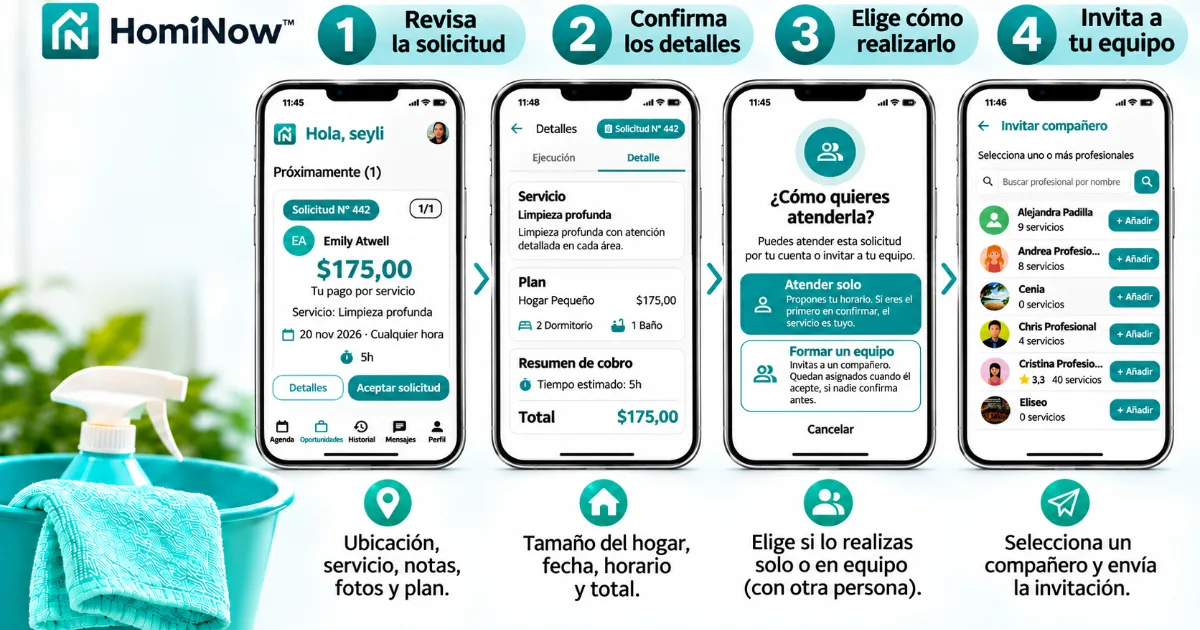
Job requests arrive as notifications in the app. Before you accept, check the location, service type, notes and the client's photos and videos. You can accept solo or as a team. When you arrive, start the job in the app; when you finish, complete it with photos. Before you accept When a request comes in, review it carefully: location and distance, service type, the client's notes and any photos or videos they uploaded. Accept only if you know how to do the service and have the supplies. Accepting is a commitment: the home size identifies the plan, but the job includes every area in the service type you accepted. Solo or as a team You can accept a job on your own or as a team with other pros. On a team, split the areas before you start, help each other when needed, leave nothing unfinished and never argue in front of the client. On the day of the job: what we recommend Confirm your arrival with the client the day before or that morning, through the app's messaging. Arrive 5 minutes early, greet the client, introduce yourself and start the job in the app. If you see existing damage, take a photo, tell the client before you start and report it in the app. Stick to the scope of the job you accepted and check with the client before doing anything extra. When you finish, do a final walkthrough, pick up your supplies and complete the job in the app with photos. Your payment arrives the day after you complete the job (timing can vary by bank), and good ratings can bring you more job opportunities. Seyli's tip: Avoid canceling a job you already accepted. If you cancel, it's posted again for another pro, and repeated cancellations have consequences under your contract. If something comes up, always let us know as early as possible.